Interdependent Filters in Shiny Made Easy

posit::conf (2026)

Josh Livingston

Tedious and not flexible

# ui.R
sidebar(
    sliderInput(
        "year",
        "Select Year Range",
        min = min(winners$year),
        max = max(winners$year),
        value = c(min(winners$year), max(winners$year)),
        step = 1
    ),
    selectInput(
        "rank",
        "Select Rank",
        choices = unique(winners$rank),
        multiple = TRUE
    ),
    ...
)
# server.R
filtered_data <- reactive({
    data <- winners
    if (!is.null(input$year)) {
        data <- data |>
            filter(year >= input$year[1], year <= input$year[2])
    }
    if (!is.null(input$rank)) {
        data <- data |>
            filter(rank %in% input$rank)
    }
    ...
})

observe({
    updateNumericInput(
        "year",
        min = min(filtered_data()$year),
        max = max(filtered_data()$year)
    )
    updateSelectInput(
        "rank",
        choices = unique(filtered_data()$rank)
    )
    ...
})

“I’ve been working on something that I think solves your problem.”

Interdependent Filters in Shiny Made Easy

posit::conf (2026)

Josh Livingston

{shinyfilters}

{shinyfilters}

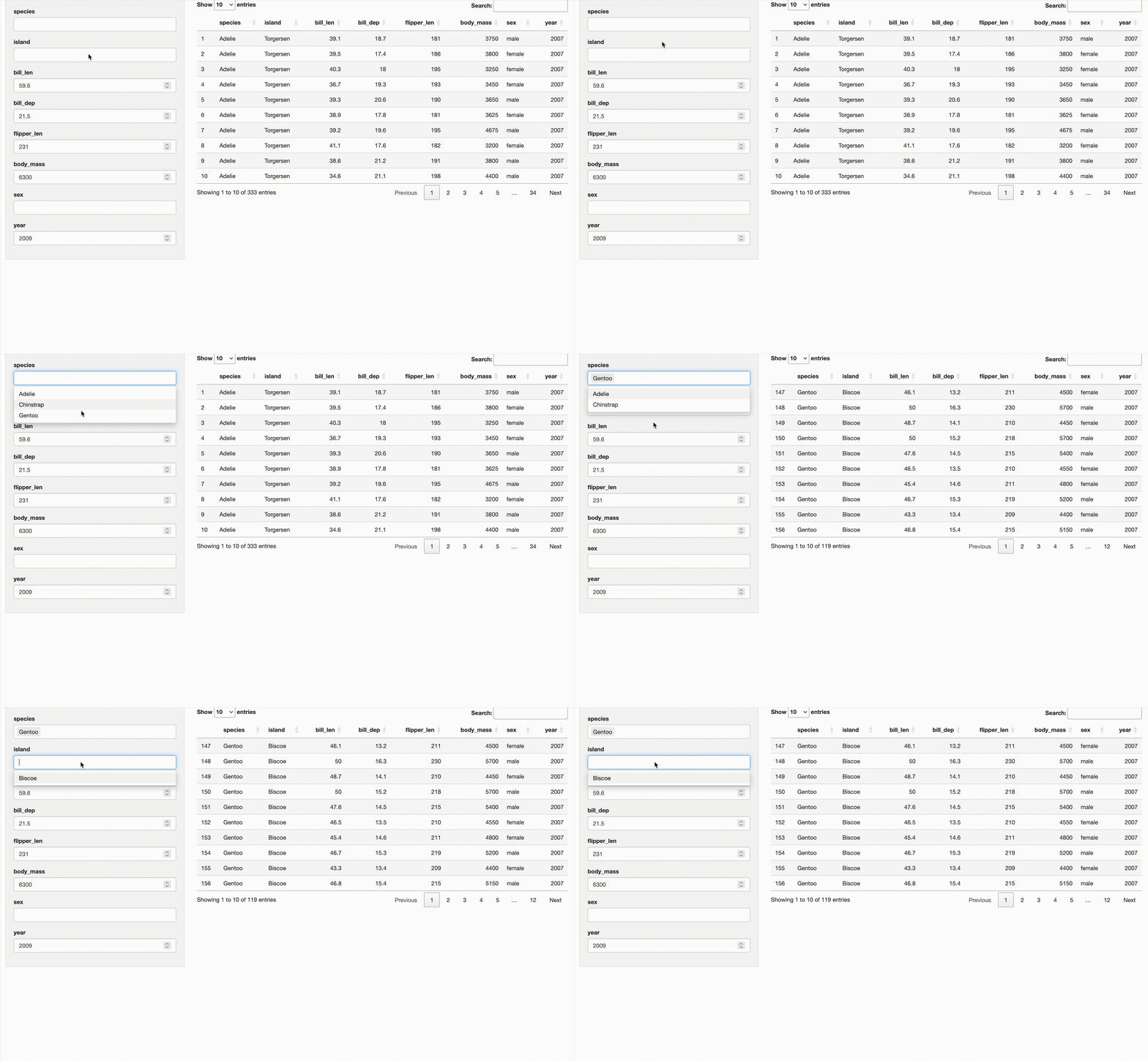
Interdepdent filters made easy

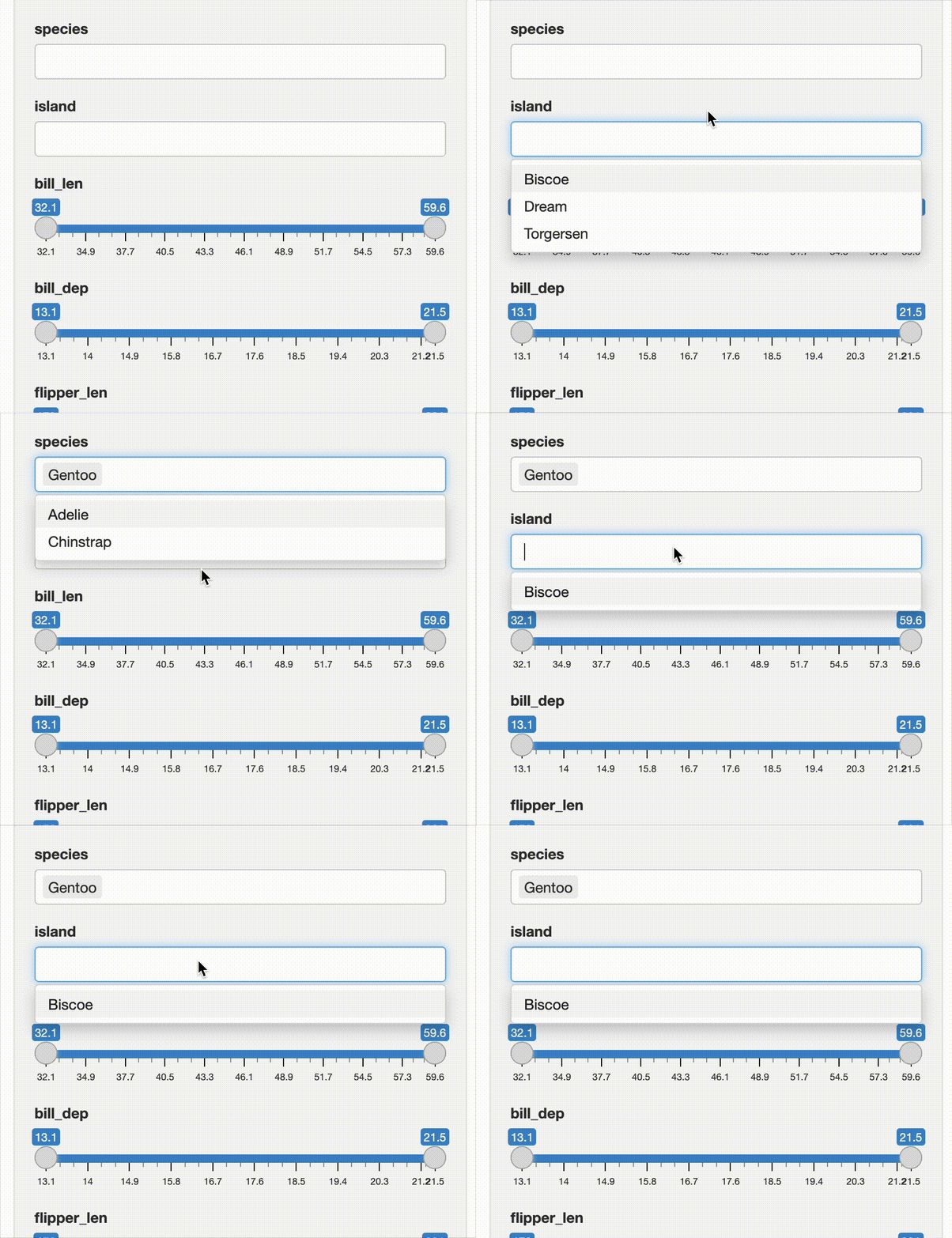
What is an interdependent filter?
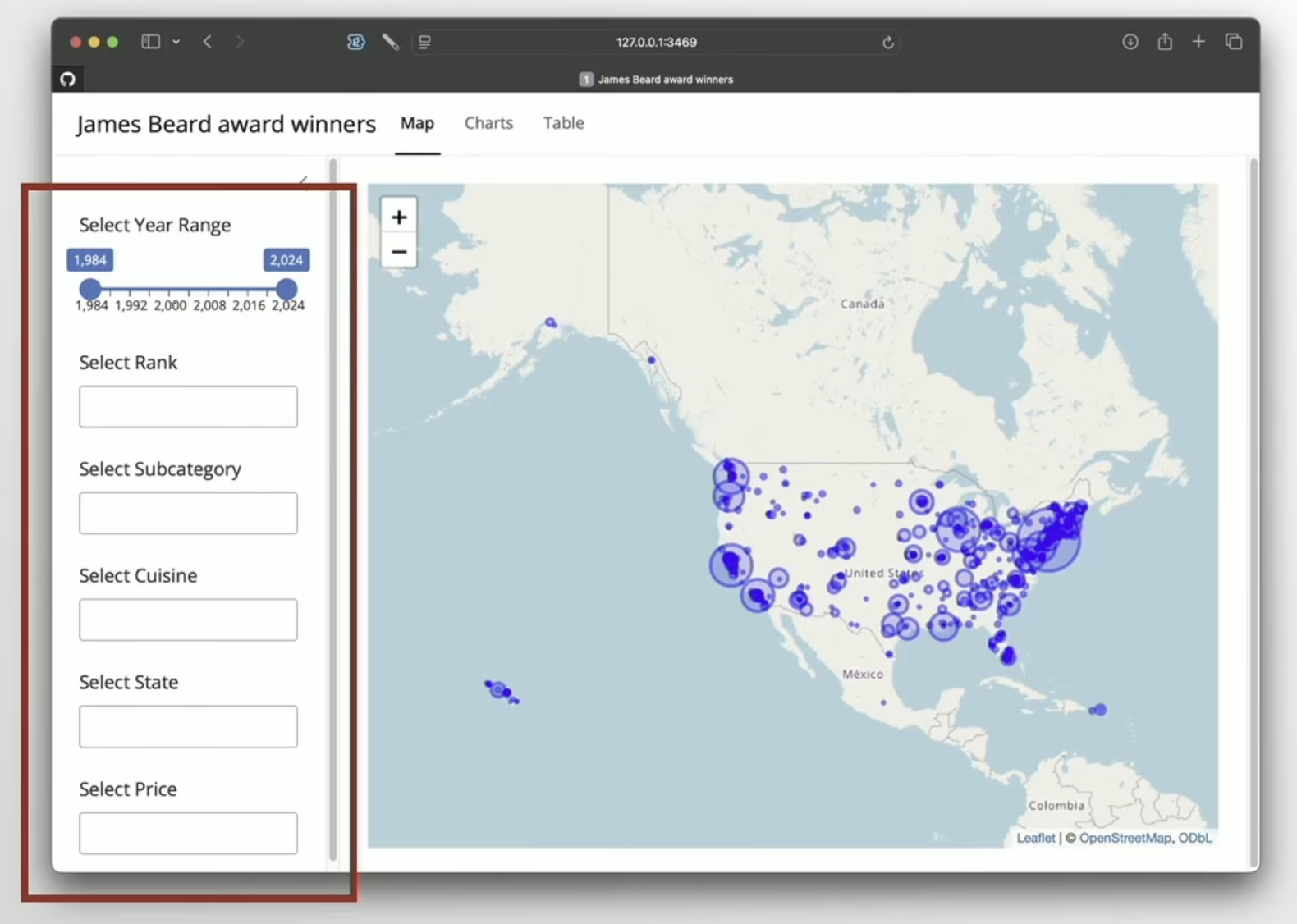
What is interdependent?
Tedious and not flexible

# ui.R
sidebar(
    sliderInput(
        "year",
        "Select Year Range",
        min = min(winners$year),
        max = max(winners$year),
        value = c(min(winners$year), max(winners$year)),
        step = 1
    ),
    selectInput(
        "rank",
        "Select Rank",
        choices = unique(winners$rank),
        multiple = TRUE
    ),
    ...
)
# server.R
filtered_data <- reactive({
    data <- winners
    if (!is.null(input$year)) {
        data <- data |>
            filter(year >= input$year[1], year <= input$year[2])
    }
    if (!is.null(input$rank)) {
        data <- data |>
            filter(rank %in% input$rank)
    }
    ...
})

observe({
    updateNumericInput(
        "year",
        min = min(filtered_data()$year),
        max = max(filtered_data()$year)
    )
    updateSelectInput(
        "rank",
        choices = unique(filtered_data()$rank)
    )
    ...
})

{shinyfilters}

# ui.R
sidebar(
    filterInput(winners)
)
# server.R
filters <- serverFilterInput(
    winners, input
)
filtered_data <- reactive({
    winners |>
        apply_filters(
            filters$input_values
        )
})

How to use {shinyfilters}

How to use {shinyfilters}

How to use {shinyfilters}

  1. Use filterInput() on a data.frame.
# somewhere in your UI...
filterInput(penguins)

How to use {shinyfilters}

  1. Use filterInput() on a data.frame.
# somewhere in your UI...
filterInput(penguins)
  1. Use serverFilterInput() in the server.
# somewhere in your server...
res <- serverFilterInput(penguins, input)

How to use {shinyfilters}

  1. Use filterInput() on a data.frame.
# somewhere in your UI...
filterInput(penguins)
  1. Use serverFilterInput() in the server.
# somewhere in your server...
filters <- serverFilterInput(penguins, input)
  1. Use the results.
# elsewhere in your server...
output$df_filt <- renderDT(datatable(
    apply_filters(penguins, filters$input_values)
))

How to use {shinyfilters}

Tedious and not flexible

# ui.R
sidebar(
    sliderInput(
        "year",
        "Select Year Range",
        min = min(winners$year),
        max = max(winners$year),
        value = c(min(winners$year), max(winners$year)),
        step = 1
    ),
    selectInput(
        "rank",
        "Select Rank",
        choices = unique(winners$rank),
        multiple = TRUE
    ),
    ...
)
# server.R
filtered_data <- reactive({
    data <- winners
    if (!is.null(input$year)) {
        data <- data |>
            filter(year >= input$year[1], year <= input$year[2])
    }
    if (!is.null(input$rank)) {
        data <- data |>
            filter(rank %in% input$rank)
    }
    ...
})

observe({
    updateNumericInput(
        "year",
        min = min(filtered_data()$year),
        max = max(filtered_data()$year)
    )
    updateSelectInput(
        "rank",
        choices = unique(filtered_data()$rank)
    )
    ...
})

{shinyfilters}

# ui.R
sidebar(
    filterInput(winners)
)
# server.R
filters <- serverFilterInput(
    winners, input
)
filtered_data <- reactive({
    winners |>
        apply_filters(
            filters$input_values
        )
})

Flexible?

How to customize {shinyfilters}

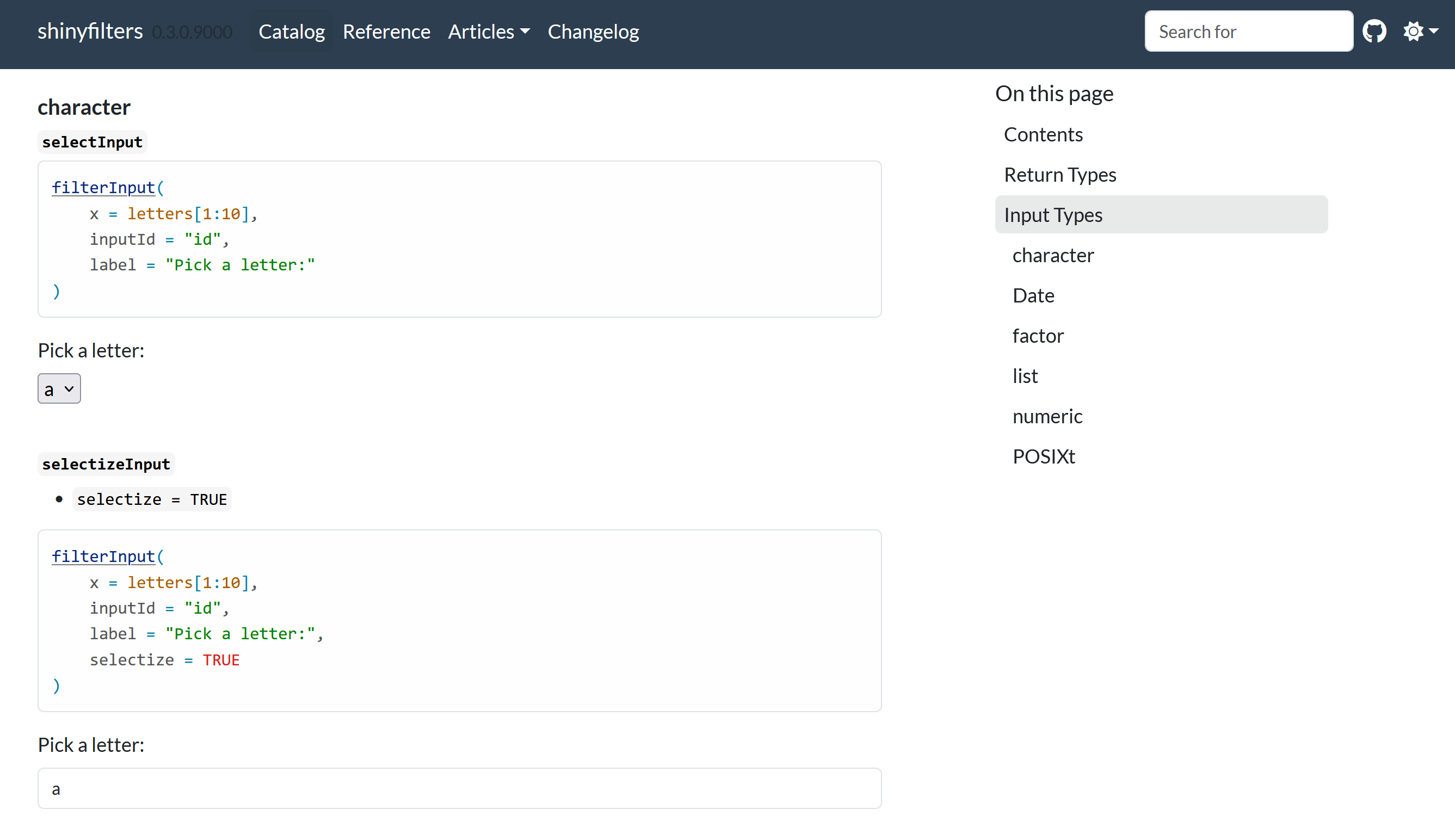
Use a different input function

Use a different input function

  • ?filterInput

Use a different input function
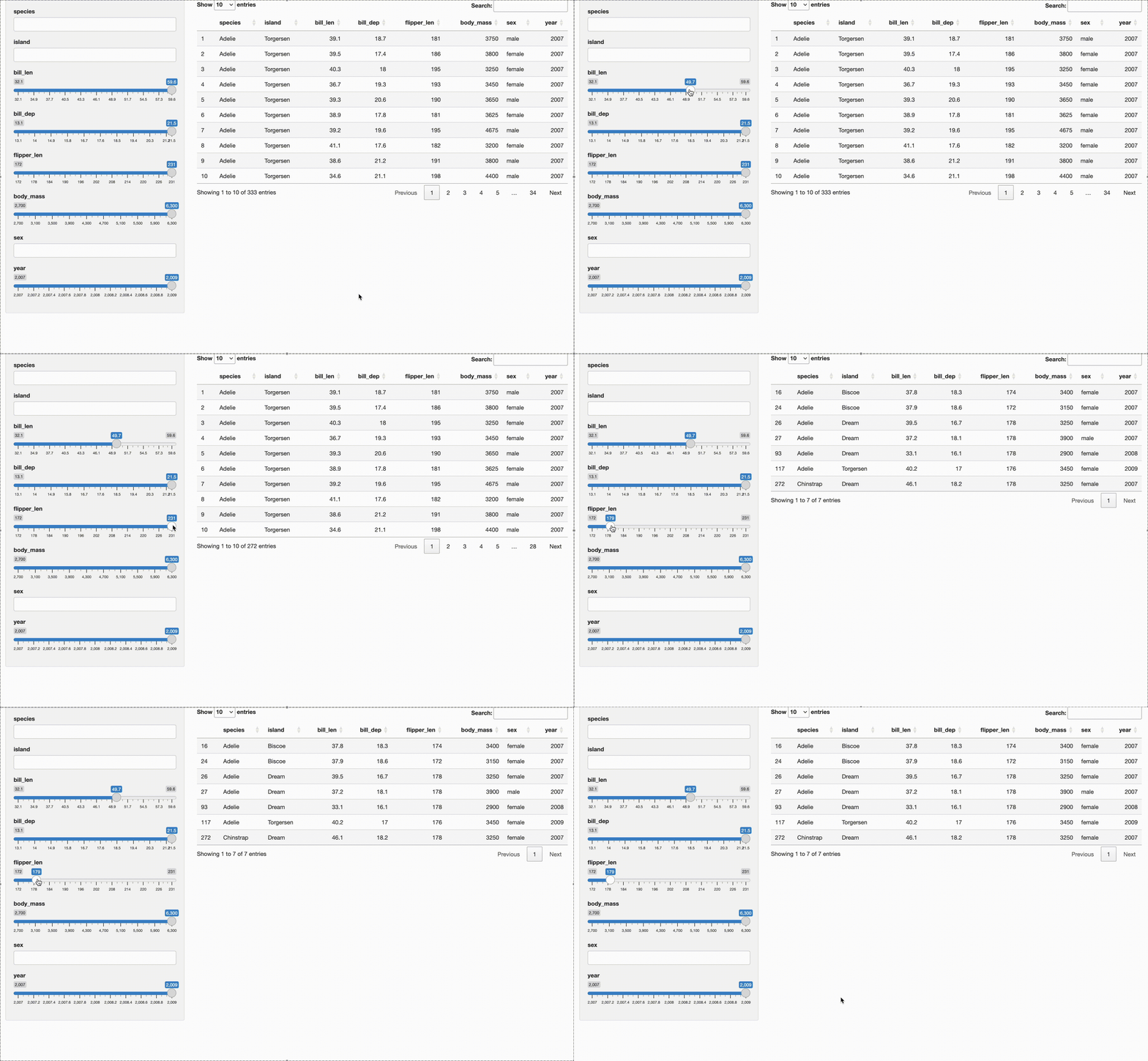
  • ?filterInput
filterInput(penguins, slider = TRUE)

Use a different input function

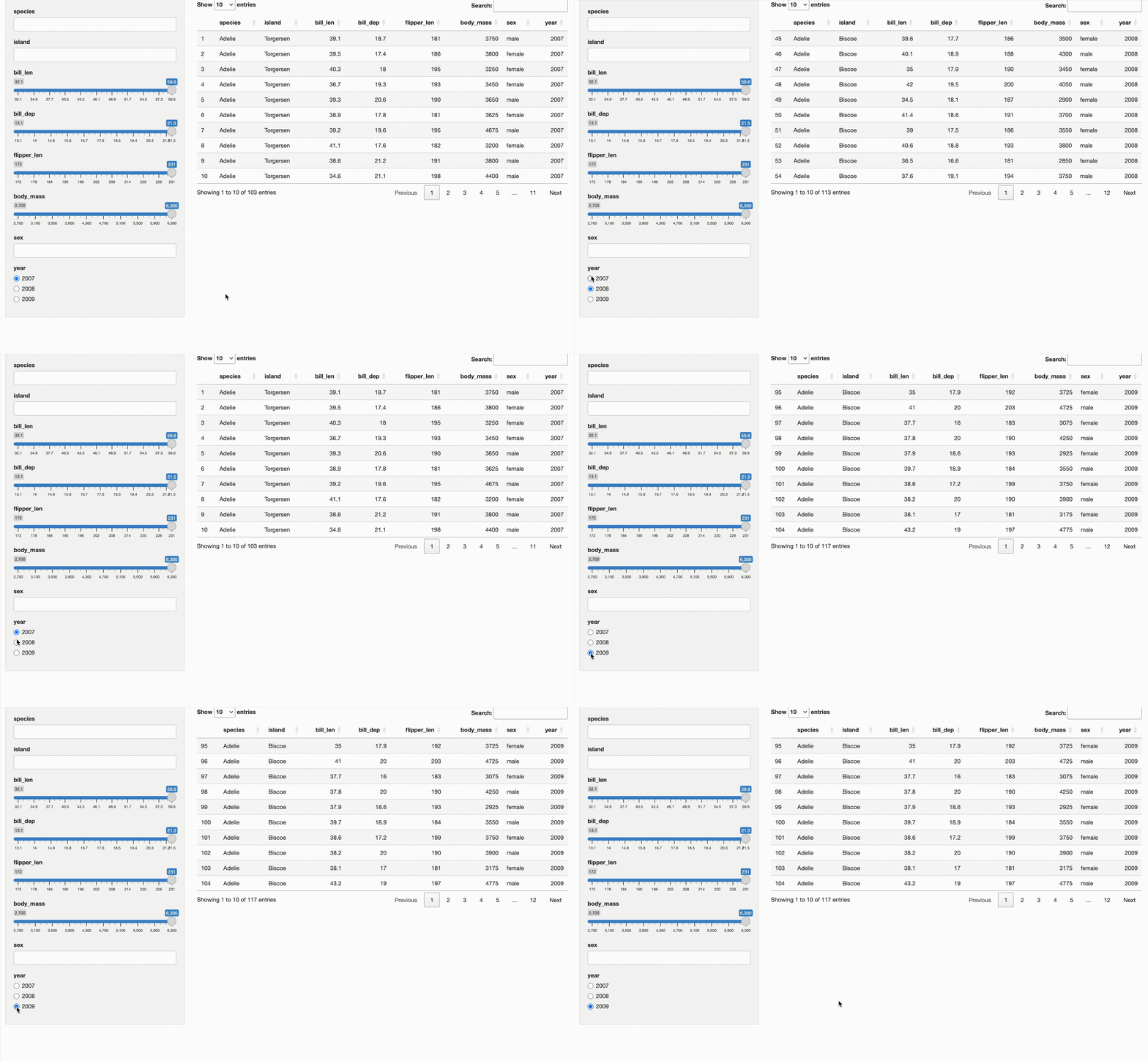
Use a function for only one column

Use a function for only one column

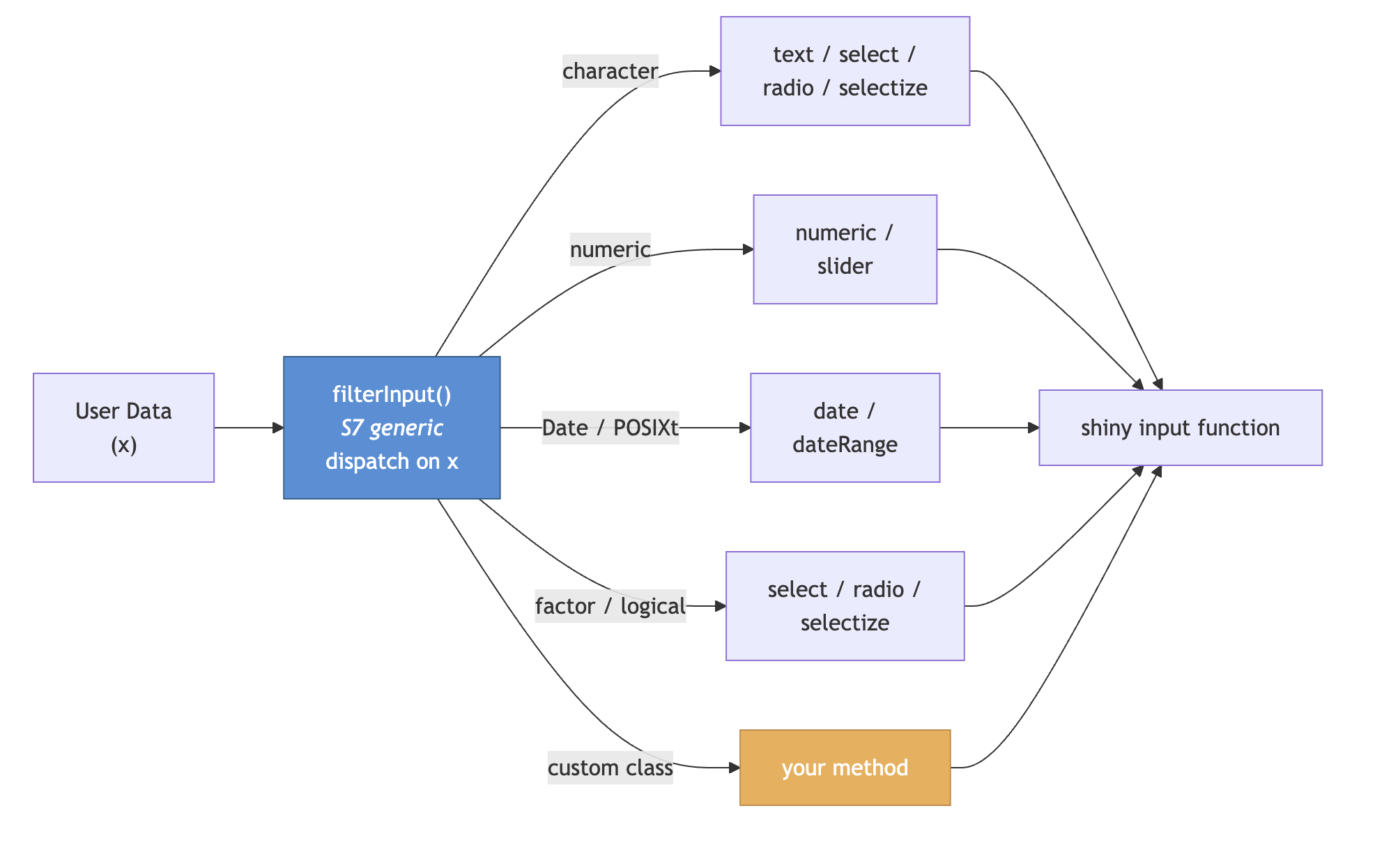
  1. Create a custom class.
library(dplyr)

penguins <- penguins |>
  mutate(
    year = structure(
      year,
      class = c("use_radio", "character")
    )
  )

Use a function for only one column

  1. Create a custom class.
library(dplyr)

penguins <- penguins |>
  mutate(
    year = structure(
      year,
      class = c("use_radio", "character")
    )
  )

Use a function for only one column

  1. Write a new method for filterInput().
library(S7)

class_radio <- new_S3_class("use_radio")
method(filterInput, class_radio) <- function(x, ...) {
    call_filter_input(x, shiny::radioButtons, ...)
}

Use a function for only one column

  1. Write a new method for filterInput().
library(S7)

class_radio <- new_S3_class("use_radio")
method(filterInput, class_radio) <- function(x, ...) {
    call_filter_input(x, shiny::radioButtons, ...)
}

Use a function for only one column

  1. Write a new method for filterInput().
library(S7)

class_radio <- new_S3_class("use_radio")
method(filterInput, class_radio) <- function(x, ...) {
    call_filter_input(x, shiny::radioButtons, ...)
}

Use a function for only one column

  1. Write a new method for filterInput().
library(S7)

class_radio <- new_S3_class("use_radio")
method(filterInput, class_radio) <- function(x, ...) {
    call_filter_input(x, shiny::radioButtons, ...)
}

Change only one column

Change the function’s arguments

Change the function’s arguments

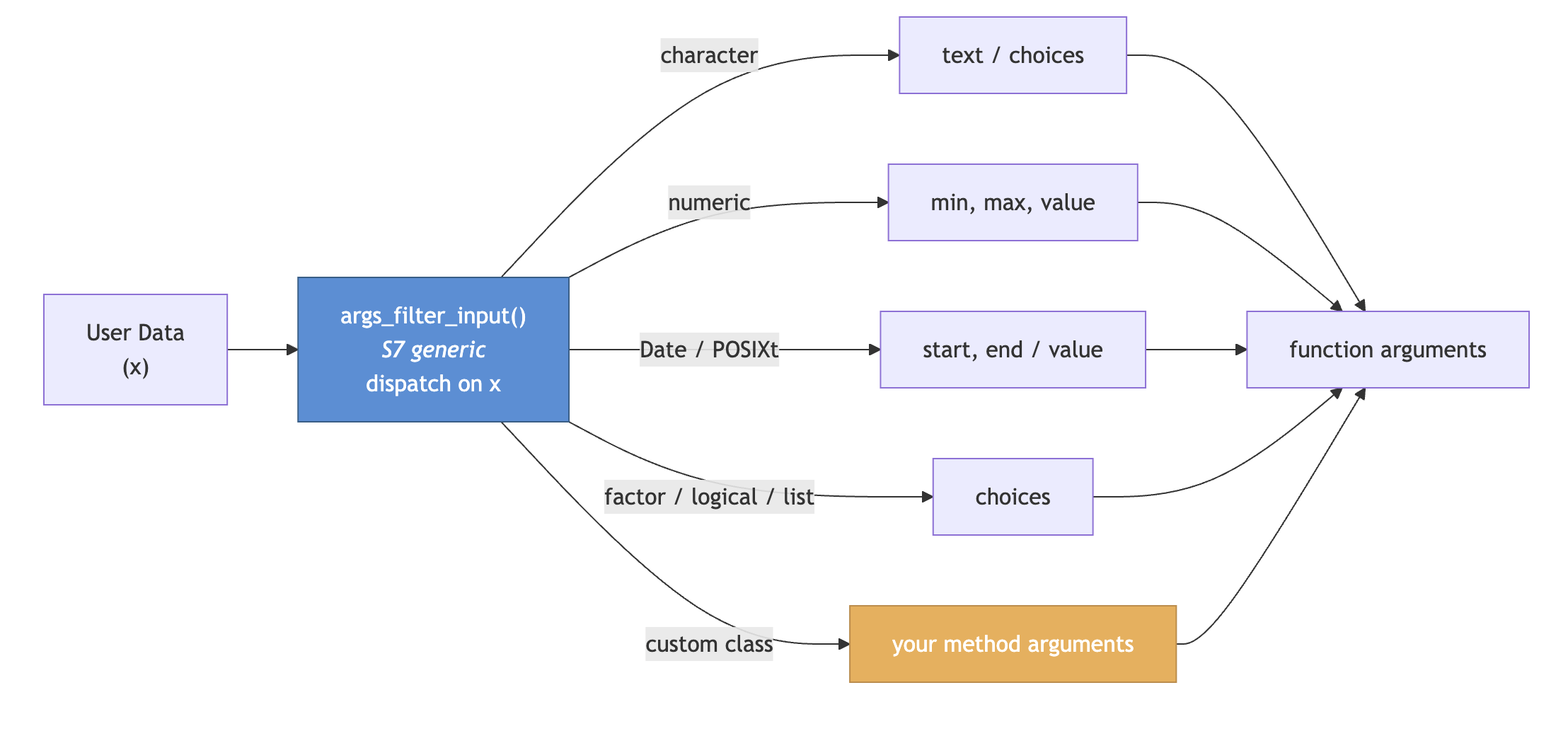
  • Extend args_filter_input()

Change the function’s arguments

  • Extend args_filter_input()
method(args_filter_input, class_numeric) <- function(x, ...) {
    min_x <- min(x, na.rm = TRUE)
    max_x <- max(x, na.rm = TRUE)
    list(
        min = min_x,
        max = max_x,
        value = c(min_x, max_x)
    )
}

Change the function’s arguments

  • Extend args_filter_input()
method(args_filter_input, class_numeric) <- function(x, ...) {
    min_x <- min(x, na.rm = TRUE)
    max_x <- max(x, na.rm = TRUE)
    list(
        min = min_x,
        max = max_x,
        value = c(min_x, max_x)
    )
}

Change the function’s arguments

  • Extend args_filter_input()
method(args_filter_input, class_numeric) <- function(x, ...) {
    min_x <- min(x, na.rm = TRUE)
    max_x <- max(x, na.rm = TRUE)
    list(
        min = min_x,
        max = max_x,
        value = c(min_x, max_x)
    )
}

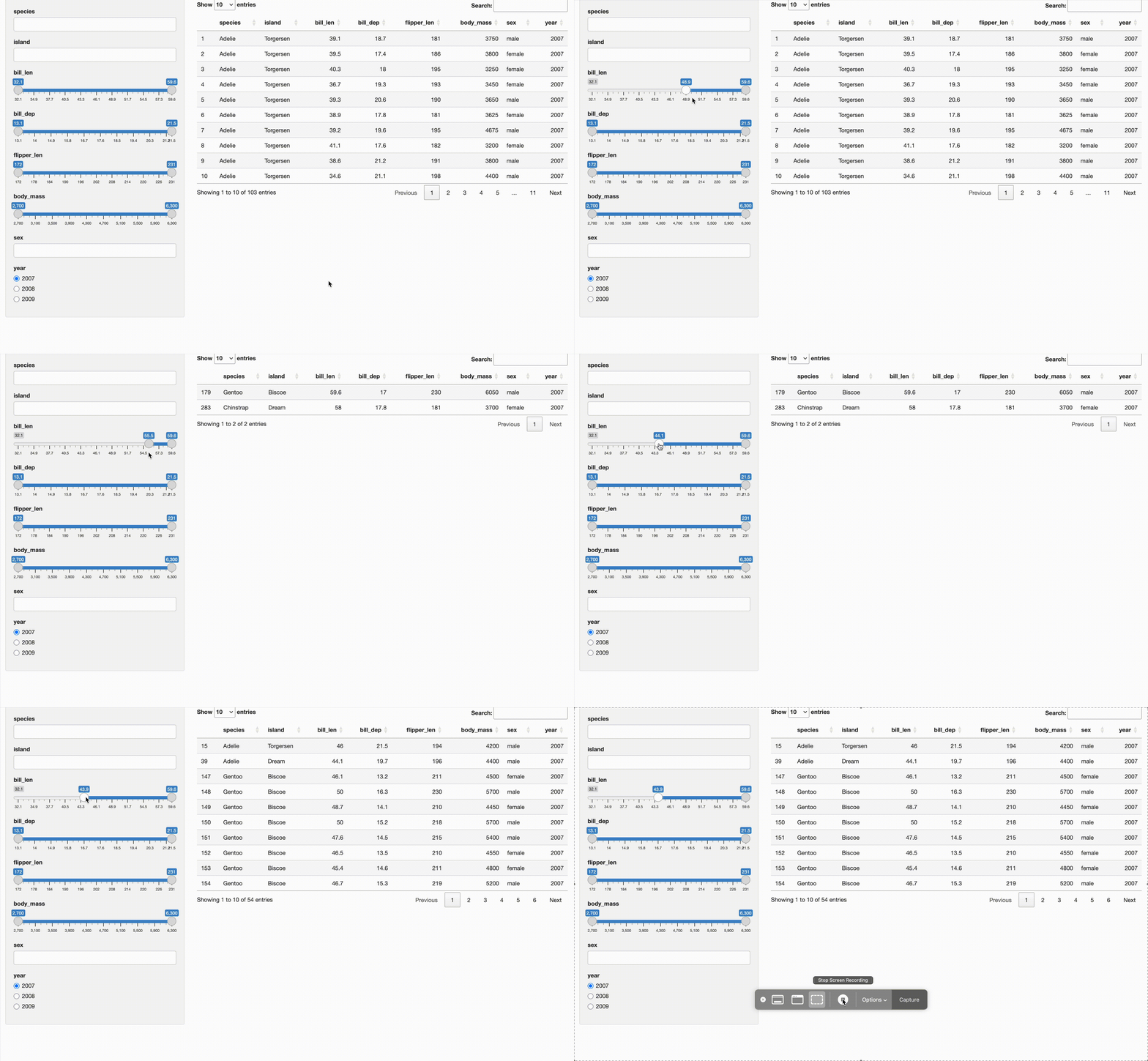
Fully customized interdependent filters
Going further

Going further
Going further
Thank you!